

Building readiness for Agent 365 at Microsoft
At Microsoft, we’re on a Frontier Transformation journey to reimagine work and redefine processes through the power of agentic AI.
Microsoft Digital, the company’s IT organization, operates a large and diverse population of agents, built across a broad range of tools and technical capabilities. With Microsoft Agent 365, we now have visibility into more than 500,000 agents.
This distributed control plane has brought agent inventory and governance into one place, giving us a clear view of agent categories, metadata, usage, and ownership information. Agent 365 has also improved our ability to track agent lifecycle and bring in new risk insights.
There’s more work to be done, but it’s already enabling enterprise-scale agent management at Microsoft. Agent 365 provides helpful information about our agent ecosystem, including the top platforms used to create them and the agents our employees use most. It presents this info in helpful, all-up views like the dashboards below.
We’re increasingly connecting agents to business-critical data, involving them in vital workflows, and using them to drive concrete business outcomes. This shift to agentic workflows has inevitably led to questions about operational readiness:
- How do we further accelerate AI-powered innovation without losing visibility, trust, and control?
- How do we create useful, powerful agents while governing them safely?
Agent 365 is becoming an essential vehicle for answering these questions as we enhance agent oversight and control for everyone involved in Frontier Transformation, from AI administrators to security professionals to business decision makers.

Agent 365: A response to the challenges of agentic governance
At Microsoft, we share many of the concerns of our customers about properly governing and managing the wide array of agents we build and surface across different platforms. We take a “self-service with guardrails” approach to our productivity estate, which means we give employees the ability to create new workspaces across their Microsoft 365 applications, while we secure assets by default and expand access based on employee needs.
The same is true for agent creation. As a result, the number of agents within our organization has grown rapidly.

“Agent 365 is giving us the confidence to let innovation happen everywhere while ensuring we always understand what agents are doing, how they’re evolving, and where IT needs to engage as a trusted partner in the process.”
Brian Fielder, vice president, Microsoft Digital
Individuals and teams can create agents through a variety of platforms, including Microsoft 365 Copilot Agent Builder, Microsoft SharePoint, Microsoft Teams, Microsoft Copilot Studio, Microsoft Azure AI Foundry, and Agents Toolkit Software Development Kit (SDK). Each platform has its own tools, back-end systems, and ways to view inventory, usage, and risk.
As agents began operating across apps and runtime environments, the need for us to break down management and governance siloes became apparent. An effective method for managing this new class of enterprise asset was required.
We wanted one shared view of all agents in our organization, tightly connected to the people responsible for administration, governance, security, and business outcomes. That’s a challenging prospect—something that no organization has done before.
Microsoft created Agent 365 in response to these needs. In Microsoft Digital, we’ve been working alongside the Agent 365 product team to implement this suite of tools within our production tenant. We’re putting these core capabilities into practice, providing a unified way to observe, manage, govern, and secure agents as they scale across our organization.
“Agent 365 is giving us the confidence to let innovation happen everywhere while ensuring we always understand what agents are doing, how they’re evolving, and where IT needs to engage as a trusted partner in the process,” says Brian Fielder, vice president of Microsoft Digital.
This guide shares what we’ve learned so far:
- How we’re using Agent 365 in Microsoft Digital
- Where we’re supplementing it with additional practices
- Lessons learned that can help you use Agent 365 more effectively, whatever your scale or AI maturity level
From product vision to production
As Customer Zero for Agent 365, it’s important that we’re candid about our journey. Much of the product’s value comes from how we’re incorporating it into our current processes, alongside existing tools.
Scale is also relevant. For smaller or simpler tenants, readiness comes faster. At an organization like Microsoft, with hundreds of thousands of agents, there are times when manual oversight isn’t enough.
We’re actively involved in co-developing the product, uncovering opportunities for capabilities like automation and programmatic solutions to support administration and governance at scale. As part of this process, we’ve partnered closely with the product team to provide continuous feedback and share learnings from our hands-on experiences.

“This has been a strong partnership—daily standups, tracking real issues, and embracing the feedback needed to make the product better. Microsoft Digital plays a critical role as our Customer Zero while operating at a scale like no one else.”
Ray Smith, corporate vice president, Agent 365 product group
Today, we’re using core Agent 365 capabilities while actively sharing feedback with the product group in the following areas:
- Centralizing an accurate inventory of all agents running in the tenant across Microsoft and third‑party platforms to provide a genuinely unified registry across all agent platforms.
- Extending existing enterprise controls by integrating with Microsoft Entra for agent identity, Microsoft Purview for data security and compliance, Microsoft Defender for threat protection, and the Microsoft 365 admin center for operations—all enhanced for improved agent control and management.
- Assisting processes to streamline the lifecycle for agents, including new lifecycle metadata like draft vs. published status, ownership tracking, and usage analysis.
- Surfacing actionable insights and risk signals related to agent behavior, access, data usage, and runtime activity, helping IT prioritize attention and response.
- Supporting enterprise scale through automation and APIs to help manage large, diverse agent deployments without relying on manual management.
While full lifecycle capabilities for certain agent platforms, risk signals, and enterprise-scale automation evolve, we continue to partner with the product group to close gaps while existing processes support current operations.
“This has been a strong partnership—daily standups, tracking real issues, and embracing the feedback needed to make the product better,” says Ray Smith, corporate vice president for the Agent 365 product group. “Microsoft Digital plays a critical role as our Customer Zero while operating at a scale like no one else.”
Chapter 1: Establishing a foundation of practice for agent administrators
A new opportunity to break down silos between roles
As we began scaling agents inside Microsoft, we discovered that the future of agent management would need to evolve from our current ways of working. We wanted a world where we could create and use agents broadly while keeping administration manageable and consistent.
Getting there required new patterns of practice for IT, especially for administrators operating across different focuses. Agent 365 unifies observability between enterprise roles, acting in concert with the broader Microsoft suite of administration, security, identity, and governance tools.
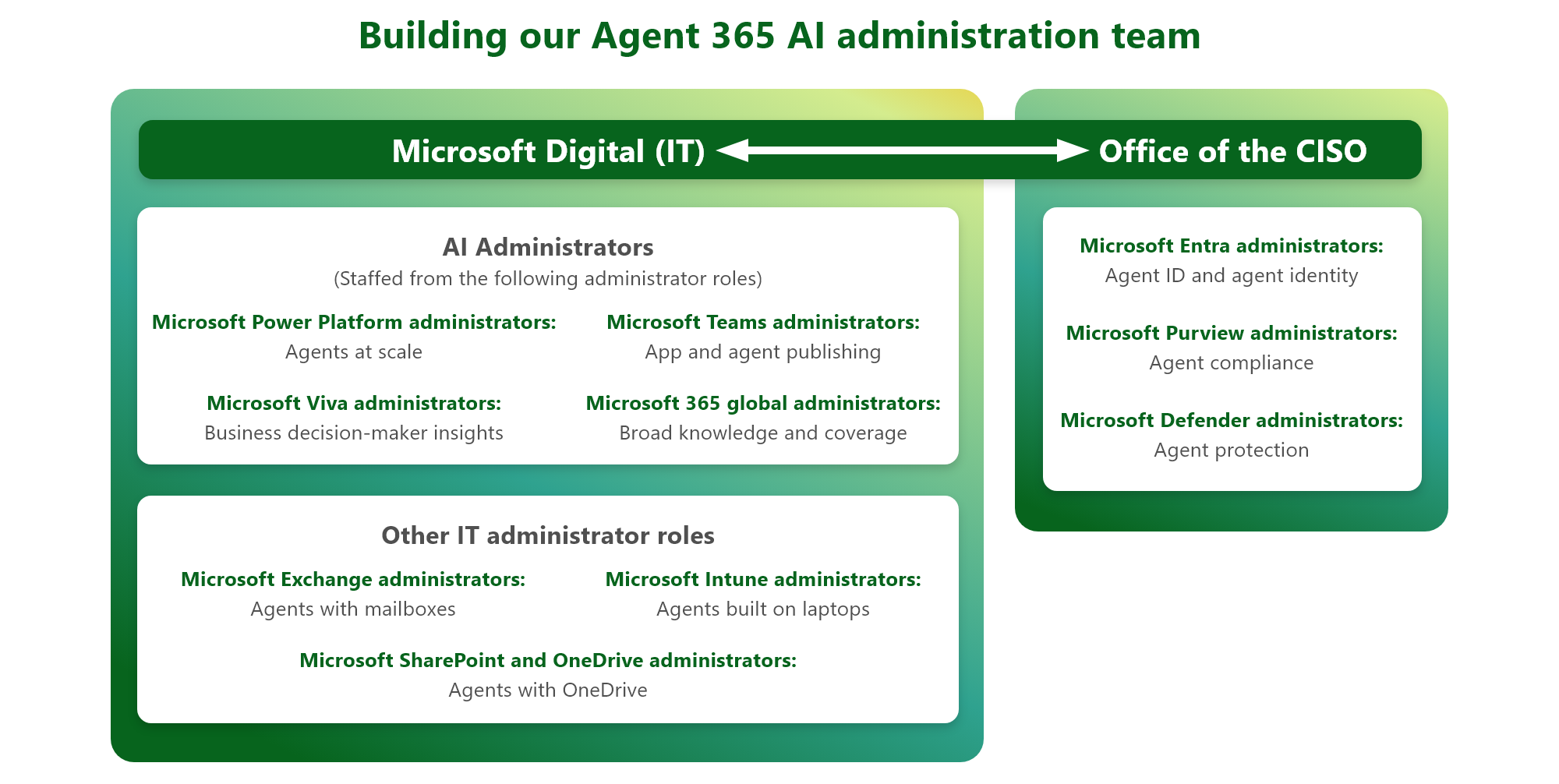
Here is a summary of the needs of different personas involved in the agent-building and management processes, grouped by office and broken down by role:
Office of the CIO

Developers and makers
Build, test, and deploy intelligent agents at scale
Products: Agent Builder, Copilot Studio, Microsoft Foundry

IT administrators
Control, govern, and monitor agents across the organization
Product: Microsoft 365 Admin Center

Agent users and business decisions makers
Get work done faster with AI-powered assistance
Products: Copilot and Teams
Office of the CISO

SecOps
Detect threats and secure agent activity in real time
Product: Microsoft Defender

Data and compliance
Protect data and enforce compliance policies
Product: Microsoft Purview

Identity manager
Manage identities and access agents and users
Product: Microsoft Entra
We’ve found that our most effective AI administrators come from existing Microsoft 365 backgrounds, because they already have deep expertise with mature tools and processes. Whether they’re generalists or specialists, your administrators will already be positioned to manage agents at scale and use their skills and experience with the tools and insights that Agent 365 delivers.
Shifting from siloed administration to coordinated responsibility
Up until this point at Microsoft, managing agents has been the responsibility of the platform administrators who control agent creation tools. SharePoint administrators manage SharePoint agents, Power Platform administrators manage Copilot Studio agents, and so on. Meanwhile, identity, security, and compliance teams handle their respective layers using Microsoft Entra, Microsoft Defender, and Microsoft Purview—often independently.
We know that this model has the potential to break down as agents become more powerful and more interconnected, and as new agent types begin to run autonomously with their own identities.

“With agents in action across multiple spaces, managing them is a special challenge. It was clear that we needed a silo-buster to govern this new ecosystem effectively.”
Jonathan Clare, principal service engineering manager, Microsoft Digital
Within Microsoft Digital, we’re using Agent 365 to differentiate agent management from platform-specific administration without replacing existing expertise. Instead of creating a single, centralized agent manager that encroaches into each platform’s territory, Agent 365 gives us one shared view across platforms, so administrators can coordinate their work with the same data and context.
With this new, single pane of glass, we’re building shared responsibility and clear handoffs where they make the most sense. For example, our AI administrators manage the full lifecycle of Microsoft 365 Copilot Agent Builder agents. But when Copilot Studio is involved, they collaborate with Power Platform administrators to strategically manage those agents in their specific environment.
Agent 365 provides the connective tissue by providing details and common metadata as we move between platforms and administrators.
“With agents in action across multiple spaces, managing them is a special challenge,” says Jonathan Clare, principal service engineering manager in Microsoft Digital. “It was clear that we needed a silo-buster to govern this new ecosystem effectively.”
Evolving agent management from existing roles
One key insight we’ve uncovered from this work is that agent administration doesn’t require a new IT skill set. It builds on the same foundational experience we already use to manage products like Power Platform, SharePoint, Exchange, and Entra, or other identity-based systems.

“We’re still iterating on the seams between administrators with different responsibilities. Agent 365 is providing the space for AI and identity administrators to work closely alongside their colleagues in security, compliance, and governance.”
David Johnson, principal PM architect, Microsoft Digital
The core skills of maintaining accurate inventory, ensuring visibility and access, managing lifecycle, and mitigating risk are already mature and deeply established in our organization. Agent 365 now gives us the broad insight we need to oversee all agents in one place.
From there, we can lean into our well-developed expertise and mature processes with newly enhanced tools, shared metadata, logging, and controls. This coordination gives each team in sequence a sense of clarity and partnership, rather than feeding effort up and down a chain of approval.
“We’re still iterating on the seams between administrators with different responsibilities,” says David Johnson, a principal PM architect in Microsoft Digital. “Agent 365 is providing the space for AI and identity administrators to work closely alongside their colleagues in security, compliance, and governance.”
As we progress, we’re developing a three‑part administrative model facilitated by the oversight that Agent 365 provides.
AI administrators, the primary users for Agent 365
- Oversee complete agent inventory and usage at the tenant level
- Manage the agent lifecycle with the platform coordination to cover a broad range of agent types
- Provide the connective tissue between security, governance, identity, and platform administrators
Agent Identity administrators, new with Agent ID
- Manage agent identities after provisioning and throughout the agent’s lifecycle
- Manage lifecycle events tied to users, access changes, and deprovisioning
- Build identity backed policies for agent workload management and risk mitigation
Security, compliance, and governance teams
- Define the guardrails that apply to agents and agent blueprints, portable specifications for agents’ identities, capabilities, constraints, policies, data access, and lifecycles
- Approve the kinds of data, tools, and permissions agents can request
- Set agent evaluation and risk assessment criteria along with risk-aligned approval workflows
- Align publishing and runtime decisions with risk tolerance and security policy
Agent 365 facilitates this model by providing comprehensive agent coverage. This acts as a shared coordination layer, bringing different administrator, security, identity, and governance roles into a unified space.
Agent 365 in practice: Agent publishing and workflows
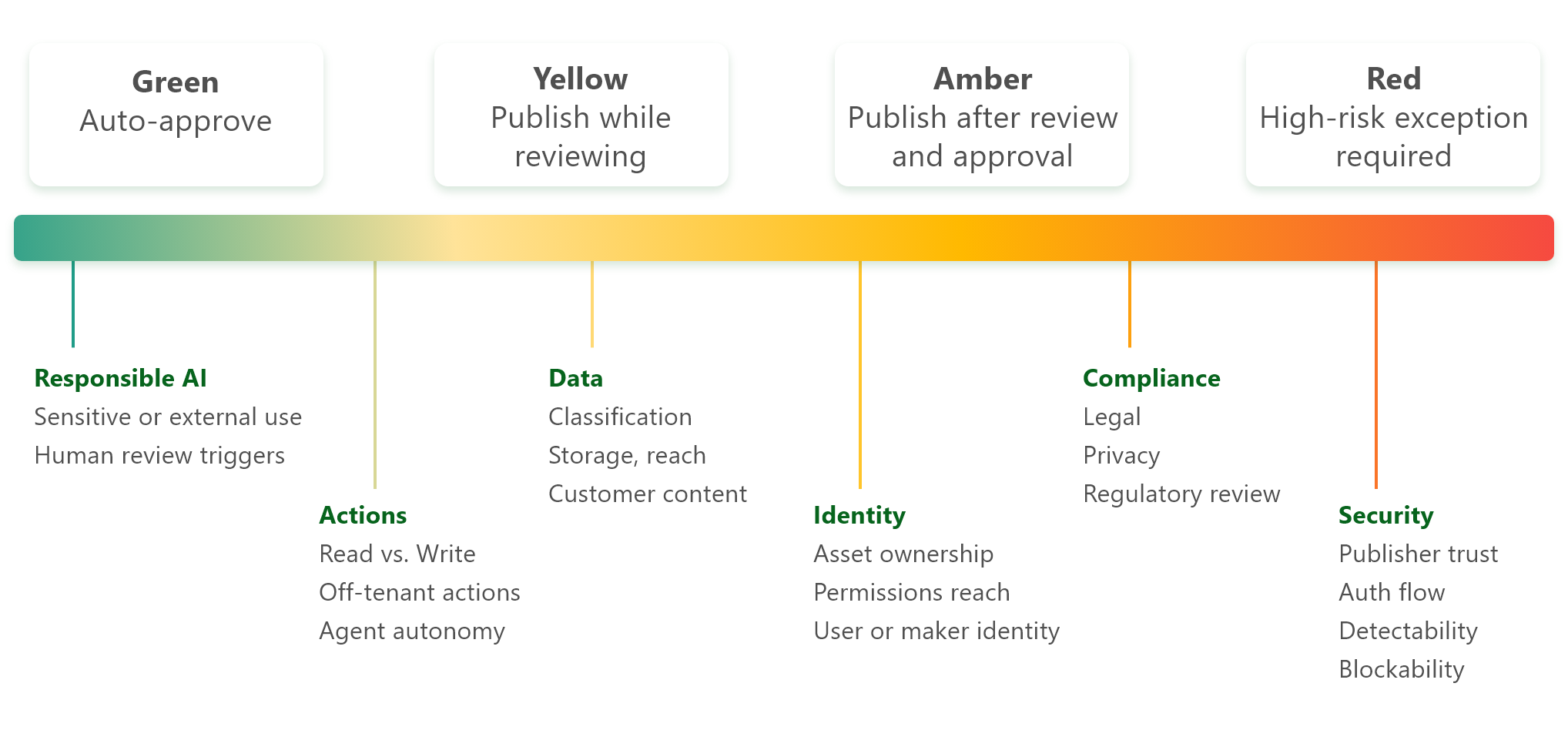
We didn’t create Agent 365 to handle every IT workflow. Many approval, vetting, and escalation processes are specific to an organization’s risk posture and operating model. At Microsoft, we’re currently handling much of that logic using an existing risk assessment and publishing workflow while evaluating how Agent 365 capabilities can simplify those steps. An example of the type of risk we look for is when an agent could read sensitive data and write it to destinations with broad access, like external sites or apps.
There are several areas of risk we use Agent 365 to assess:
Agent 365 itself assists us with additional risk awareness:
Real-time
- Observability across agents
- Surfacing signals from identity, security, and governance systems
- Supporting the ability to act when risks or issues surface
Proactive
- More intelligent risk insight during the agent permissioning and approval processes
- Consistent agent publishing into the environment
- Forthcoming capability: the ability to integrate with our existing agent review and publishing process that spans multiple teams, including administration, governance, and security
As you consider ways to collaborate across your own administrator teams, our silo-busting approach can act as a helpful guide.
Key takeaways
Use these practices to build your foundation for agent administration:
- Clearly parse security, governance, AI administration, and identity responsibilities. Define collaborative channels and explicit handoffs between the teams that manage these domains.
- Treat Agent 365 as an oversight and coordination layer. It isn’t a replacement for platform or identity administrator expertise, but it’s the best place to look at the big picture.
- Determine your criteria for agent risk assessment and publishing approval. Collaborate with relevant security, privacy, HR, legal, and other teams to calibrate your risk tolerance.
- Define your agent lifecycle expectations. Tie these back to any governance you may have in agent creation workloads like SharePoint and Copilot Studio.
- Establish visibility first, then layer in approval workflows. Match them to your organization’s risk tolerance and operating model.
- Avoid creating a bureaucratic choke point. Successful agent administration depends on partnership and choreography, not centralization, where one administrator does it all.
- Invest in cross-collaboration. Strengthen virtual teams, especially across identity, security, and agent creation surfaces.
- Expect your administrative model to evolve. As Agent 365 matures and new lifecycle and approval capabilities become available, new practices will emerge organically.
Learn more
How we did it at Microsoft
- Learn how we’re extending our infrastructure to manage agents with Microsoft Agent 365. This post will show you how we approached agent inventory, registration, and lifecycle management as Customer Zero, including the role of Entra Agent ID and cross‑platform ingestion.
- See how we’re infusing Responsible AI into our internal AI projects at Microsoft. This guide shares how we’re ensuring our AI initiatives reflect the principles of fairness, reliability and safety, privacy and security, transparency, accountability, and inclusiveness.
- Read how Microsoft works councils are helping us transform into an AI-first Frontier Firm. This story outlines ways that IT professionals work with different stakeholders, including regional employee advocacy groups, to enable technology.
- Find out how we’re powering the new age of AI-led engineering in IT at Microsoft. Read about the evolution of the role and discipline of engineering in the Microsoft IT department.
Further guidance
- Get an overview of Agent 365 for administrators to see what’s possible, based on different administrator roles.
Chapter 2: Building a registry of agents to manage them at scale
A centralized source of truth for AI agents across the enterprise
As agents have proliferated across Microsoft, visibility has proven essential for robust governance. Without a clear understanding of all the agents that exist in our environment, including their origin and how people use them, it’s very difficult to make informed decisions or respond confidently when risks emerge. Establishing a thorough registry of agents and their key information is a critical step in governing the ecosystem.
Agent 365 provides that oversight.
Why an agent registry matters
An agent registry establishes the foundation for oversight, control, and compliance. As an organization introduces more agents, the environment can quickly become fragmented and difficult to track.
A comprehensive registry provides a single, authoritative inventory that makes every agent visible, tracks ownership, and captures key metadata. With that baseline, organizations can consistently govern, secure, and manage their agents with confidence.

“Managing agents begins with having a complete inventory with rich information, like their name, lifecycle status, type, ID, owner, where we created them, and where we’re using them. Once you have that level of clarity, everything else—security, compliance, lifecycle management—becomes much easier to manage.”
Mike Powers, AI administrator, Microsoft Digital
At the scale of a company like Microsoft, even small gaps in visibility can quickly become operational hurdles or compliance liabilities. Without that foundation, an organization faces substantial risks:
- Ownerless agents remain active after employees leave the company.
- Shadow or unsanctioned agents are difficult to detect.
- Oversight is unreliable with respect to agent growth, usage, and impact.
“Managing agents begins with having a complete inventory with rich information, like their name, lifecycle status, type, ID, owner, where we created them, and where we’re using them,” says Mike Powers, an AI administrator in Microsoft Digital. “Once you have that level of clarity, everything else—security, compliance, lifecycle management—becomes much easier to manage.”
Agent 365 registry capabilities
Within Agent 365, the registry acts as a central inventory enriched with metadata. We use that metadata to meet compliance, security, and management standards, including:
- Agent ownership and associated teams
- Creation platforms and publishing surfaces
- Lifecycle states like “draft” or “published”
- User scope: who can discover and use the agent
In Microsoft Digital, we’re providing real-world feedback to the Agent 365 product group to enable even more types of metadata, like differentiation between system vs. user-created agents, and new agent types like AI teammates. We’re also using metadata surfaced from the platform where the agent was created, for example, the Power Platform environment ID for Copilot Studio agents and the Azure AI Foundry subscription details for Foundry agents.
Agent 365 amalgamates all of this metadata into a single view.
This structure matters because agents vary widely. Some are short‑lived experiments. Some belong to only one employee, while others are broadly shared. Treating them all the same doesn’t make sense.
From an administrative perspective, the registry gives us:

A summary view of total agent count

Insights around growth and adoption

Identification of agents without owners

Analytics on platforms used to make agents and their usage trends

Search, sort, and filtering with customizable columns to get detailed views across agent types

Robust inventory export capabilities to support collaboration with security, compliance, and business stakeholders
Establishing our Agent 365 registry
The agent registry is an out-of-the-box feature for Agent 365, so there’s nothing to deploy or configure. As Customer Zero, we’ve focused much of our early work on validating the registry for accuracy and completeness.
Agent 365 automatically ingests agent metadata from supported platforms. This technology is still new, so we’ve partnered with product teams across SharePoint, Power Platform, Azure AI Foundry, and other builder experiences to reconcile counts, ensure accuracy, and request additional relevant metadata.
For first-party tools, Agent 365 creates registry entries automatically. Third-party agents can also benefit from automatic registration if their creators use the Agent 365 SDK during development.
For pro‑code scenarios, Entra Agent ID is key. Registering an agent through Entra assigns it a formal identity, which lays the groundwork for consistent identity and lifecycle management and conditional access policies.
Acting on the registry
The registry is a living system. Ownership changes, while lifecycle states and usage signals update automatically.
That means the registry supports critical processes for administrators that include:
- Passing audits for elements like tracking agent ownership
- Presenting the tenant’s agent footprint and usage to business decision makers
- Scoping agents to specific users, or excluding users based on regional or regulatory requirements
- Highlighting high‑impact agents based on usage and runtime
A single view has been one of the most valuable outcomes for us, enabling informed operational decisions and peer-to-peer collaboration.
Looking ahead
The registry is also the prerequisite for future experiences, including broader agent discovery and publishing. Moving forward, it will provide the context we need to guide reuse, review, publishing, and eventual retirement to support intentional agent lifecycle practices over time. As a result, it will be easier to combat sprawl and ownerless agents.
In Microsoft Digital, our early Agent 365 efforts have focused on validating our agent registry to lay the foundation for comprehensive observability. It may be helpful for you to mirror this approach.
Key takeaways
Here’s what we’ve learned during the initial stages of building and operating our agent registry:
- The registry isn’t just an inventory. It’s the foundation for agent governance and insights to help take more informed actions and avoid risk.
- Establish accountability. Use the registry to ensure every agent has a clear owner and lifecycle state.
- Dive deep for the most value. Analyze the Agent 365 inventory export files and compare them with any previous methods you used to gather information about agents, for example, Power Platform, SharePoint, or other bespoke methods, to ensure accuracy and consistency.
- Break down silos using the agent registry. The information Agent 365 provides will break down administrative silos across IT, security, identity, and business teams for more informed and collaborative analysis and discussions about agent adoption.
Learn more
How we did it at Microsoft
- This readiness guide shares the lessons we’ve learned in the initial phases of our agentic AI journey. Follow our guide for deploying AI agents based on our experience at Microsoft.
- Check out our guide to agent governance. Discover the best practices for governance we developed as we implemented AI agents internally.
- See how we’re powering data governance at Microsoft with Purview Unified Catalog. This story outlines how Microsoft tools help establish data governance at scale.
Further guidance
- Read the Agent 365 registry documentation to see how you can catalog and manage your agents.
Chapter 3: Visualizing agents to support oversight and action
Observability: Scaling beyond dashboards
At the scale of an organization like Microsoft, dashboards alone aren’t enough. We already have hundreds of thousands of agents in use across the company. At that scale, it would be impossible to review these agents individually. We rely on well-established governance in the form of guardrails, established software development lifecycle procedures, and risk-based app and agent management policies that trigger reviews when we detect risk.
Agent 365 helps us operationalize oversight using automation and rules engines, programmatic access via APIs and scripting, and bulk actions based on attributes like permissions, connectors, and usage patterns.
A simple user interface is essential for visibility, assessment, and decision‑making. Programmatic access is essential for execution. Effective agent administration requires both.
The lesson is that administering agents during Frontier Transformation requires a new approach that breaks out of traditional roles and inter-team hierarchies. By incorporating our experience into your own planning, you can use Agent 365 more effectively.
Why visualization matters
As agents spread across Microsoft, we learned that inventory alone isn’t enough. Knowing an agent exists is helpful, but understanding how people use it, how it connects to data and other agents to complete workflows, and where risks or concentration points emerge is what makes effective governance possible at scale.
In a Frontier Firm where almost anyone can create agents, observability is a core pillar of management. Like many organizations, we built agents first and only later confronted the challenge of seeing what existed. Agent 365 will help other organizations reverse that order by surfacing agent behavior continuously from the start.

“Just this first layer of visualizing our agent ecosystem in one central place is a big step toward flowing them into our business processes and demonstrating ROI more effectively.”
Amy Ceurvorst, director of business programs, Microsoft Digital
Visualization is helping us address questions we couldn’t answer before:
- Where is agent growth accelerating?
- Which agents are widely used?
- Where do risk hot spots occur across connectors, data sources, and permissions?
- What demands attention now, and what can wait?
“We’re uncovering so many new use cases for agents,” says Amy Ceurvorst, a director of business programs in Microsoft Digital. “Just this first layer of visualizing our agent ecosystem in one central place is a big step toward flowing them into our business processes and demonstrating ROI more effectively.”
The agent landscape changes quickly, and with Agent 365, we can look at usage at the individual agent level to track shifts over time. For example, Cowork (Frontier) is one of our newest agents, but in just a few weeks it became our most widely used.
In a recent review of Cowork adoption, Agent 365 allowed us to quickly analyze names, session activity, and locations for Cowork’s 58,000 active users in just a few minutes.
This is also where Agent 365 complements rather than replaces Viva Insights:
- Viva Insights combines Agent 365 data with our organization’s people data to provide enhanced insights into agent usage across the organization.
- Agent 365 provides oversight for the full agent estate: registry, publishing, ownership, lifecycle, and governance.
Both are important, but they serve different personas. Where Viva helps clarify usage for adoption leaders and change managers, Agent 365 helps determine what action IT should take next.
The Viva Insights Agent Dashboard extends the data in Agent 365 by translating agent inventory and telemetry into executive‑ready insights on adoption, usage patterns, and trends across the organization. By combining agent activity with organizational context, it helps leaders understand where people are using agents, how adoption is evolving over time, and where opportunities or risks may exist.
Together, Agent 365 and Viva Insights provide a governed, end‑to‑end view that supports informed decisions about scaling and governing agents to drive business impact.
From insight to action
One of our biggest lessons as Customer Zero is that visualization only matters if it leads to action. In Agent 365, insights increasingly surface as prioritized scenarios, such as risky, ownerless, or unused agents. We can then pair those insights with paths to response—for example, meeting compliance expectations by re-assigning or retiring ownerless agents.

“Agent 365 is saving us time by helping us analyze the kinds of issues that are common in agent management and bringing those to our administrators’ attention. It acts as a command center that surfaces those issues programmatically, so we’re able to prioritize the actions we need to take.”
Nate Zimmer, senior product manager, Microsoft Digital
Visualization in Agent 365 is about prioritization. For us, some of the most valuable scenarios include:

Ownerless agents
Visualization helps us distinguish unused agents we can retire vs. heavily used agents that need reassignment.

Duplication and naming patterns
Many agents share similar names. Visual signals help differentiate them based on usage and connections.

Trending agents
Rapid adoption can signal value or risk, necessitating a closer look for administrators.

Strategic adoption signals
Identify high-impact agents to scale as business priorities.
The goal is to focus attention where it counts.
“Agent 365 is saving us time by helping us analyze the kinds of issues that are common in agent management and bringing those to our administrators’ attention,” says Nate Zimmer, a senior product manager in Microsoft Digital. “It acts as a command center that surfaces those issues programmatically, so we’re able to prioritize the actions we need to take.”
Continuously clearing the fog
Observability is never finished. New agent types and creation tools continue to emerge. Agent 365 helps us embrace that reality by connecting signals across Microsoft 365, identity, security, and compliance for a continuously updated view of an evolving agent landscape.
We believe the Agent Map is going to be a differentiator in agent visualization, and we’re closely working with the product team to inform new, robust capabilities that will help us drill down to find hot spots, details on agent connectors, tools, and knowledge sources more easily.
For example, we use the large surface area provided by the Agent Map to search and filter for exactly what we want and then dive deeper into details.
Observability has been crucial for helping us guide agent usage at Microsoft. As you conduct Frontier Transformation at your organization, consider ways that observability has led to better oversight for our team, and incorporate them into your AI administrators’ discipline.
Key takeaways
Think about these lessons from Microsoft Digital as you considering using visualization for managing your agents:
- Prioritize your attention. Use visualization to surface and remediate your greatest liabilities.
- Scale through technology. Pair visualizations with the registry to operate at the right level of detail. Many visualization features also support targeted exports, for example, exporting just the users accessing a specific agent.
- Prepare for new issues and risks. With greater visibility comes heightened awareness of issues. Expect visualization to surface new risks and new personas as agent adoption grows.
Learn more
How we did it at Microsoft
- Learn how we’re reshaping Microsoft with continuous improvement and AI. This story shares how we prioritize, implement, track, and guide AI initiatives through continuous improvement practices.
Further guidance
- Read the Agent 365 documentation around observability to see how visualization can support your agent governance efforts.
- Explore the Microsoft Viva Insights documentation to understand how the agent dashboard supports adoption leaders and change managers.
Chapter 4: Securing agents and aligning Agent 365 with organizational priorities
Melding agent oversight, identity, security, and governance
In Microsoft Digital, we’ve learned that securing agentic AI isn’t about inventing an entirely new security model. Instead, the focus should be on extending the identity, data, and threat protections we already trust, while also making risk visible in one place. Agent 365 plays a critical role by surfacing agent‑related security signals in a single view so that IT teams can see what matters quickly, even when remediation happens elsewhere.
The agentic security challenge
Up to this point, understanding agent risk has meant pulling information from multiple tools and manually stitching together context. Identity management lives in one place, data protection in another, and threat insights somewhere else. That makes it harder for IT administrators to spot patterns and gain insight.

“A lack of visibility creates real security risk, exposed data access, unmonitored behaviors, and unmanaged identities. Agent 365 helps us regain control by building a comprehensive inventory and risk profile of agents.”
Prathiba Enjeti, principal security manager, CISO
Other factors compound the challenge:
- People and teams are creating agents quickly, accelerating the need for manual reviews.
- Agents can operate across apps, data sources, action types, data, and data destinations, and they carry the potential for other agents to expand the attack surface, complicating oversight and control.
- Risk emerges at multiple stages, both during agent development (design time) and during execution (run time).
“This lack of visibility creates real security risk, exposed data access, unmonitored behaviors, and unmanaged identities,” says Prathiba Enjeti, a principal security manager for the Microsoft CISO organization. “Agent 365 helps us regain control by building a comprehensive inventory and risk profile of agents.”
Theoretically, existing agent governance policies and practices should mitigate these risks, but there are always exceptions. It’s easy to miss early warning signals, and teams may only detect issues after they have an impact.
Agent 365 helps us identify and remediate those issues.
Agent 365 as a security visibility layer
As we bring Agent 365 into our operational workflows, it connects with Microsoft Purview, Microsoft Entra, and Microsoft Defender, surfacing relevant agent‑specific risk insights in a cohesive experience. That reduces fragmentation and supports more informed, coordinated decisions.
You can see how Agent 365 capabilities apply to different members of the agent administration and management ecosystem.
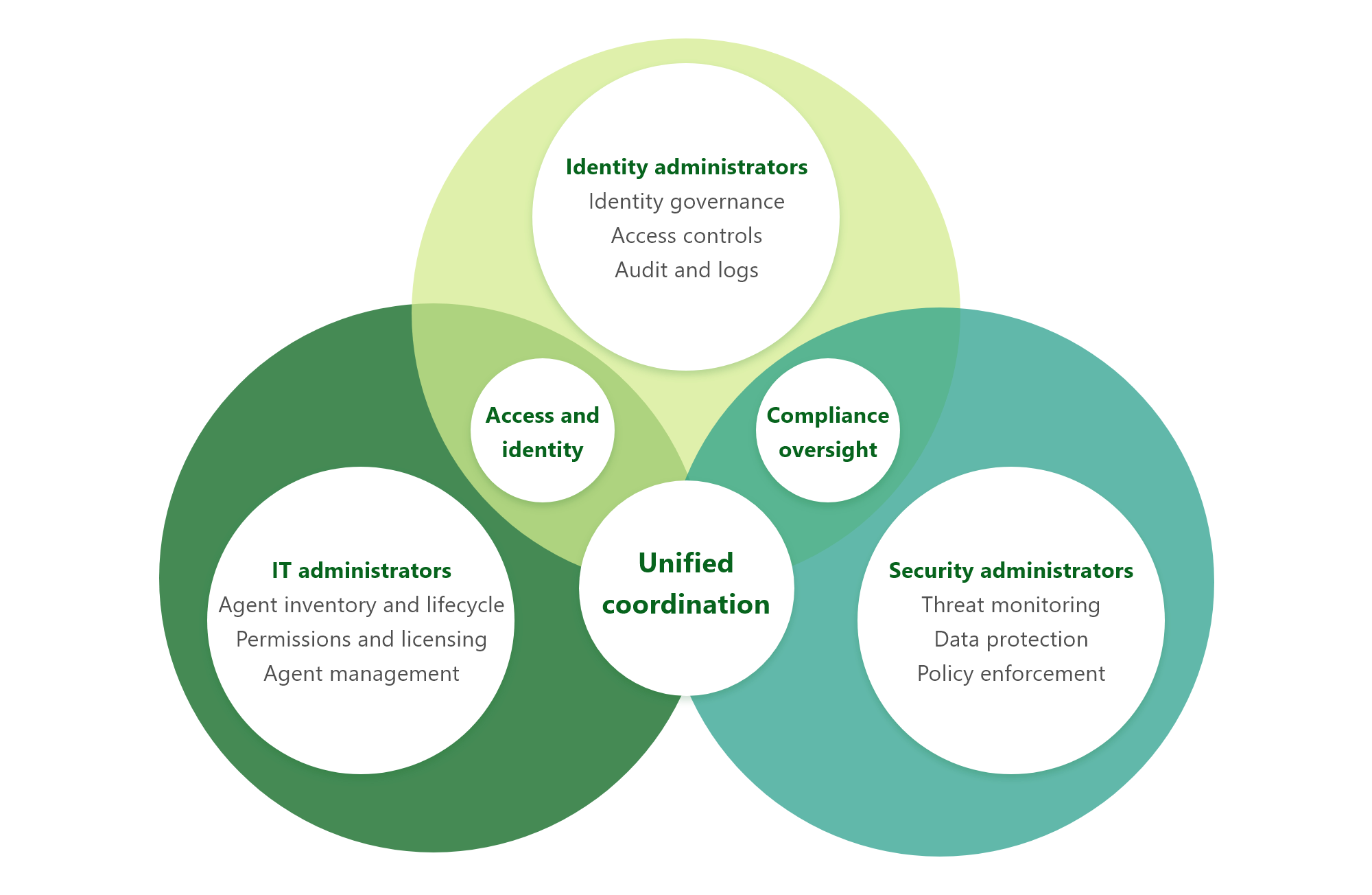
Rather than replacing those tools, Agent 365 ingests identity signals from Entra, data signals from Purview, and runtime behavior from Defender. In practice, we think about agent security in two main categories:
- Build‑time risk: These signals surface when people create or configure agents. Examples include overly broad permissions, insecure configurations, or missing responsible AI safeguards. Seeing these early helps reduce downstream risk and rework.
- Run-time risk: As agents operate, they can expose data unexpectedly, become susceptible to vulnerabilities like prompt injection, or lose protection as data moves across systems. Run-time visibility becomes even more important as agents begin working together.
Agent 365 doesn’t eliminate these risks, but it does have the capacity to make them more visible, traceable, and easier to prioritize and mitigate. Follow‑up actions still happen in Entra, Purview, and Defender, but now those administrators benefit from improved oversight and coordination.
What we’ve learned so far
Internally, broader visibility has helped us uncover issues we had difficulty tracking before, like ownerless agents spanning multiple platforms or unexpected data handling behaviors. While more broadly available agent oversight might seem intimidating because it widens scrutiny, we’ve found that additional data and insights have accelerated alignment and improved decision making.
With Agent 365, we now have better conversations through shared context and metadata. As a result, IT, security, and business teams can discuss adoption trends and mitigate risk using the same information instead of chasing it across tools.
Key takeaways
You can follow the lessons we’ve learned while further securing agents using Agent 365:
- Oversight is not a replacement for security. Use Agent 365 as a central visibility layer, not a substitute for existing security tools and practices.
- Creation and operation both contain risks. Expect security signals at both build time and runtime.
- Build a practice of consolidation. Prioritize investigation using consolidated signals, even when remediation happens elsewhere.
- Choreograph the tools between teams and functions. Integrate Agent 365 into existing security operations rather than creating parallel workflows.
Learn more
How we did it at Microsoft
- Shaping AI management at Microsoft with Agent 365 and Copilot controls. Explore how we’re bringing agents under management alongside existing identity, security, and governance controls to create a unified operating model.
- Discover the most important thing to know about securing AI. This video shares insights on AI security from a Microsoft CISO.
- See how we’re protecting AI conversations at Microsoft with Model Context Protocol security and governance. This story shares how we’re streamlining MCP governance through secure-by-default architecture, automation, and inventory to deliver a faster, safer agent development environment at Microsoft.
- Learn how we’re balancing risk and innovation in the era of AI at Microsoft. Read about our Fast Train model and how early, controlled AI adoption accelerates learning while safeguarding trust and compliance.
- Explore ways we’re applying engineering fundamentals to securing AI. Get advice from a CISO at Microsoft in this video.
Further guidance
- Dive into the Agent 365 security documentation to learn how the platform integrates with Defender to better protect your agents and organization.
- Explore the documentation for Agent 365 and Microsoft Purview to see how the two platforms work together to manage data security and compliance for agents.
- Explore Microsoft Entra guidance for Agent 365 to learn how agent identity fits into agentic environments, including identity lifecycle management, access governance, and policy enforcement.
Conclusion: Turning visibility into confidence as agents scale
As we reflect on the early days of Agent 365, visibility is the foundation for everything that follows. As Customer Zero, our priority has been to understand the full extent of agents across our environment.
The real value will come when we can drill down further. How are people using agents? What risk patterns repeat? What building and usage trends emerge as Frontier Transformation progresses?

“When we started, I thought the hardest part would be the technology, but it turned out to be building the weekly rhythm where IT, security, identity, product, and business unit teams could look at the same picture, make decisions from the same facts, and act together. My advice to every IT leader is to establish that governance rhythm before your agent count grows faster than your ability to manage it.”
Garima Tiwari, principal product manager, Agent 365 Customer Zero, Microsoft Digital
As we mature in our use of Agent 365, it will give us greater ability to move from simple metrics like volumes of agents to more meaningful measures of impact. It will also help us see trends in our environment by segmenting low-use experimental agents from business‑critical digital workers so we can move beyond isolated usage to scaled adoption.
It’s important to be clear about where we are on this journey. Our operating model for Agent 365 isn’t complete. Much of our current focus is still on seeing clearly by surfacing trends, comparisons, and emerging patterns we couldn’t identify before.
“When we started, I thought the hardest part would be the technology, but it turned out to be building the weekly rhythm where IT, security, identity, product, and business unit teams could look at the same picture, make decisions from the same facts, and act together,” says Garima Tiwari, a principal product manager for Agent 365 Customer Zero in Microsoft Digital. “My advice to every IT leader is to establish that governance rhythm before your agent count grows faster than your ability to manage it.”
That visibility is already paying dividends by revealing duplication, ownerless agents, and cross‑platform risks that would otherwise remain uncovered. Over time, those insights will increasingly feed automation, lifecycle workflows, and deeper integrations across identity, security, and governance.
Looking ahead, our next steps are about translating this oversight into action at scale. That will include preparing for broader agent discovery, refining lifecycle management, and enabling new personas, such as managers who are responsible for selecting, creating, and overseeing digital workers. It will also encapsulate learning as new agent types, tools, and usage patterns emerge. Change is constant in a Frontier Firm environment; readiness is something you build continuously, not something you check off once.

“Agent 365 represents a new operating model for AI at scale. By bringing visibility, governance, and security together, it helps organizations move beyond experimentation and toward a future where agents are trusted and embedded in everyday work, all without slowing innovation.”
Stephan Kerametlian, senior director, Microsoft Digital
Our overall message in this guide is straightforward: You don’t need to have every answer on day one. What matters most is establishing the conditions for safe evolution as agents scale. Think about clear administration practices, a reliable registry, effective observability, and security signals you can trust. Here at Microsoft, Agent 365 has become an important part of that foundation.
“Agent 365 represents a new operating model for AI at scale,” says Stephan Kerametlian, a senior director in Microsoft Digital. “By bringing visibility, governance, and security together, it helps organizations move beyond experimentation and toward a future where agents are trusted and embedded in everyday work, all without slowing innovation.”
We’ll continue sharing what we learn as Customer Zero. As your organization moves through its own Frontier Firm transformation, we hope these lessons help you build the confidence to innovate quickly, supported by comprehensive insights, thoughtful governance, and security that scales with your ambition.
Key takeaways
Here are the essential top-level learnings that we’ve developed from our Customer Zero experience with Agent 365 so far. They can help guide your own readiness and implementation journey:
- Agent governance is becoming a team sport. Agents touch on identity, permissions, data access, workflow automation, compliance, and business outcomes. That means agent governance requires cross-team alignment.
- Start with visibility, not perfection. You don’t need a fully mature operating model on day one. What matters most is creating shared visibility and data about what agents exist, how people use them, and where risks or opportunities are emerging.
- Treat agent management as an evolution of IT practice. Managing agents builds on familiar disciplines like identity, lifecycle, access control, and security rather than replacing them.
- Clearly define roles and handoffs. Effective agent governance depends on clear coordination between security teams, AI administrators, identity administrators, and platform owners. Think choreography, not hierarchy.
- Use registries and metadata to enable an increased understanding of agents. A reliable agent registry with ownership, lifecycle state, and usage data is foundational. Without it, agent sprawl, duplication, and ownerless agents become unavoidable as adoption grows.
- Rely on visualization to focus attention where it matters most. Visualization is about surfacing patterns, hotspots, and trends so IT can prioritize action, especially in large or complex environments.
- Plan for continuous learning, not a finished state. Agent ecosystems evolve quickly. New agent types, tools, and usage patterns will continue to emerge. Readiness is an ongoing capability that improves as oversight, automation, and governance mature together.
Try it out
Related links
- See how we’re extending our infrastructure to manage agents at Microsoft.
- Learn how we’re shaping AI management at Microsoft with Agent 365 and Copilot controls.
- Read our guide for deploying AI agents based on our internal experience.
- Learn from our journey governing AI agents at scale at Microsoft.
- Check out our four-part IT playbook for the AI era.
