|
FAQ
1. I’ve installed the new PowerPivot for Excel add-in… now what do I do?
|
|
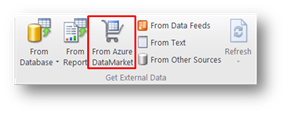
Once you install the new add-in, go to the PowerPivot work area and you’ll notice under the “Get External Data” section a new icon that allows you directly discover and consume data from DataMarket
2. In addition to being able to directly connect to DataMarket, are there any other new functionality in PowerPivot for Excel or PowerPivot for SharePoint? This updated version only adds direct access to Marketplace and no additional functionality is being shipped in PowerPivot for Excel. There’re no changes in PowerPivot for SharePoint either.
3. I just installed the latest version of PowerPivot from Download Center but I don’t see the DataMarket icon.
It takes about 24 hours to replicate the new bits into all the servers WW. Please be patient and again after a few hours |

Related posts
-
SQL Server 2016 end of support is here: Plan your next steps
See what changes as SQL Server 2016 reaches end of support. -
How the Microsoft SQL team is investing in SQL tools and experiences
Microsoft is modernizing SQL tools with AI, SSMS, Visual Studio Code, and DevOps features to boost productivity and future-proof development. -
Innovation spotlight: How 3 customers are driving change with migration to Azure SQL
Learn how Microsoft Azure SQL Managed Instance helps organizations move from legacy constraints to a scalable and secure AI-ready foundation.