
Define your rotation pattern once — Workforce Management runs it automatically and predictably, cycle after cycle.
Managing rotating shift schedules for customer service teams can be complex and time-consuming. Whether you operate a 24×7 support organization, a global business process outsourcing (BPO) operation, or a regional service desk, maintaining consistent shift rotations often requires significant manual effort.
Today, we’re announcing Shift Rotation Policies in Dynamics 365 Workforce Management, a new capability that lets supervisors define a rotation pattern once and let the scheduler run it automatically, cycle after cycle.
The problem: rotation done manually doesn’t scale
Talk to any workforce manager running a 24×7 operation and you’ll hear a version of the same story:
- A biweekly rotation across morning, evening, and night slots takes 2–4 hours of supervisor time per shift plan, per cycle.
- Rotation logic lives outside the scheduling system — usually in a spreadsheet — which means every schedule regeneration risks breaking the pattern.
- Coverage requirements are rarely uniform across the week, so weekday and weekend patterns have to be assembled by hand, shift by shift.
- Agents have little visibility into the rotation, because they can’t see how the pattern works or when they’ll move to the next slot.
- New joiners, exits, and long absences quietly desynchronize the rotation, and the supervisor has to correct it manually.
When this issue multiplies across 10, 30, or 50 shift plans, rotation administration becomes a bottleneck. It gets in the way of the work supervisors are actually hired to do: coaching agents and running the operation.
Introducing Shift Rotation Policies
Shift Rotation Policies bring the rotation pattern into Workforce Management. Supervisors build the policy once and attach it to one or more shift plans. From that point on, the auto-scheduler consults the policy every time it generates bookings, drawing agents from the correct rotation cohort based on where each shift plan is in its cadence.
No spreadsheets, manual re-shuffles, or guesswork.
What you can configure
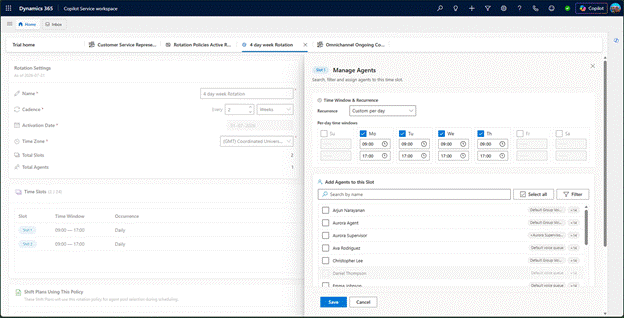
\A cadence and a set of slots makes up a rotation policy. Each slot is one position in the rotation, and each is defined on its own terms:
- A rotation cadence that matches your business. Set how frequently the rotation advances — weekly, biweekly, monthly, or any multi-week cycle that suits your operation.
- Between 2 and 24 slots per policy. Model anything from a simple two-way day/night swap to a highly segmented coverage pattern.
- Start and end times per slot. Each slot carries its own working window, so slots can differ in both timing and length rather than being uniform blocks.
- Day-of-week validity per slot. Choose the days each slot applies to, so weekday, weekend, and compressed patterns are expressed directly in the policy.
- Agent cohorts assigned to each slot. Supervisors decide exactly which service representatives sit in each slot, and the whole cohort advances together as the rotation moves.
- Activation date and time zone. Set when the policy takes effect and the time zone it operates in, so distributed teams stay aligned.
- Reuse across shift plans. One policy can drive rotations for multiple shift plans, so you don’t rebuild the same pattern for every plan.
- Pause, resume, or detach at any time. Freeze cohort positions when operations change, then resume — or detach the policy to return to non-rotation scheduling.
Putting it together
Consider a regional service desk that supports customers seven days a week, with heavier volumes on weekdays and lighter weekend traffic. The workforce team creates a single policy on a four-week cadence with four slots, and assigns one cohort to each:
| Slot | Days | Hours | Cohort |
| Early | Monday–Friday | 06:00–14:00 | Cohort A |
| Late | Monday–Friday | 14:00–22:00 | Cohort B |
| Peak support | Tuesday–Friday | 11:00–19:00 | Cohort C |
| Weekend | Saturday–Sunday | 09:00–19:00 | Cohort D |
Every four weeks, each cohort advances one position: Cohort A moves to Late, Cohort B picks up Peak support, Cohort C takes the weekend rota, and Cohort D moves to Early. Weekday mornings and evenings stay fully covered, the mid-week volume peak gets a dedicated overlapping block, and weekend duty circulates across the whole team instead of landing on the same people every month.
The team configures this once. Every subsequent schedule generation applies it, and the pattern in the policy is exactly the pattern that appears on the schedule board.
| 🌍 At global scale A global BPO running 24×7 support from three centers previously spent close to a full day per fortnight manually reassigning agents across morning, evening, and night windows. With a single biweekly policy linked to their shift plans, that work now happens as part of every schedule generation — freeing the workforce team to focus on forecasting and coverage quality instead of rota mechanics. |
Get started–in three steps
- Create a rotation policy. In Workforce Management, open the Shift Rotations page and create a policy. Set the name, activation date, time zone, and the cadence at which the rotation advances.
- Define your slots and assign agents. Add your slots, set the hours and days each one covers, and assign the service representatives who belong to each slot.
- Link the policy to your shift plans. Open a shift plan, select the rotation policy, and save. The next auto-schedule run draws agents from the cohort whose rotation position matches each booking’s window.
What makes this different
Traditional rotation approaches rebuild the schedule from scratch every cycle, or hard-code the rotation into individual agent calendars. Shift Rotation Policies work differently:
- Reusable by design. One policy drives rotations across as many shift plans as you need.
- Native to the scheduler. Rotation is not a bolt-on utility. It’s a first-class input to the auto-scheduler, so bookings are always consistent with the rotation cohort.
- Explicit, not inferred. Supervisors decide exactly who belongs to which slot — no black-box logic reshuffling agents in ways employees can’t anticipate.
- Built for real coverage patterns. Hours, days, slot count, and cadence are all configurable, so the policy reflects how the operation actually runs rather than forcing it into a uniform template.
- Fully reversible. Rotation state is managed centrally, so pausing or unwinding a rotation never means rebuilding schedules by hand.
Why this matters
Shift Rotation Policies deliver value on three sides of the operation:
| For supervisors | For agents | For the business |
| Hours of manual rotation admin per cycle disappear. That time returns to coaching, quality reviews, and running the floor. | Rotations become transparent and predictable. Agents can see the pattern, know which days and hours they work, and know when they move to the next slot. | Coverage becomes consistent and easy to scale — whether you run one shift plan or five hundred, rotation is a configuration, not an operational cost. |
Availability
Shift Rotation Policies will be generally available in Dynamics 365 Workforce Management on 15th August. The capability can be configured by supervisors in Customer Service admin center, under Workforce Management → Shift and Scheduling.
Learn more and get started
- Read the documentation: [Manage Shift Rotation]
- See what’s new in the Dynamics 365 release plan: [Release Planner]
We built Shift Rotation Policies alongside customers running some of the most complex customer service operations in the world. Does your organization run rotating shifts today? We’d love to hear how you plan to use this. Share your feedback in the comments or reach out to your Microsoft account team.